Never lose your place again
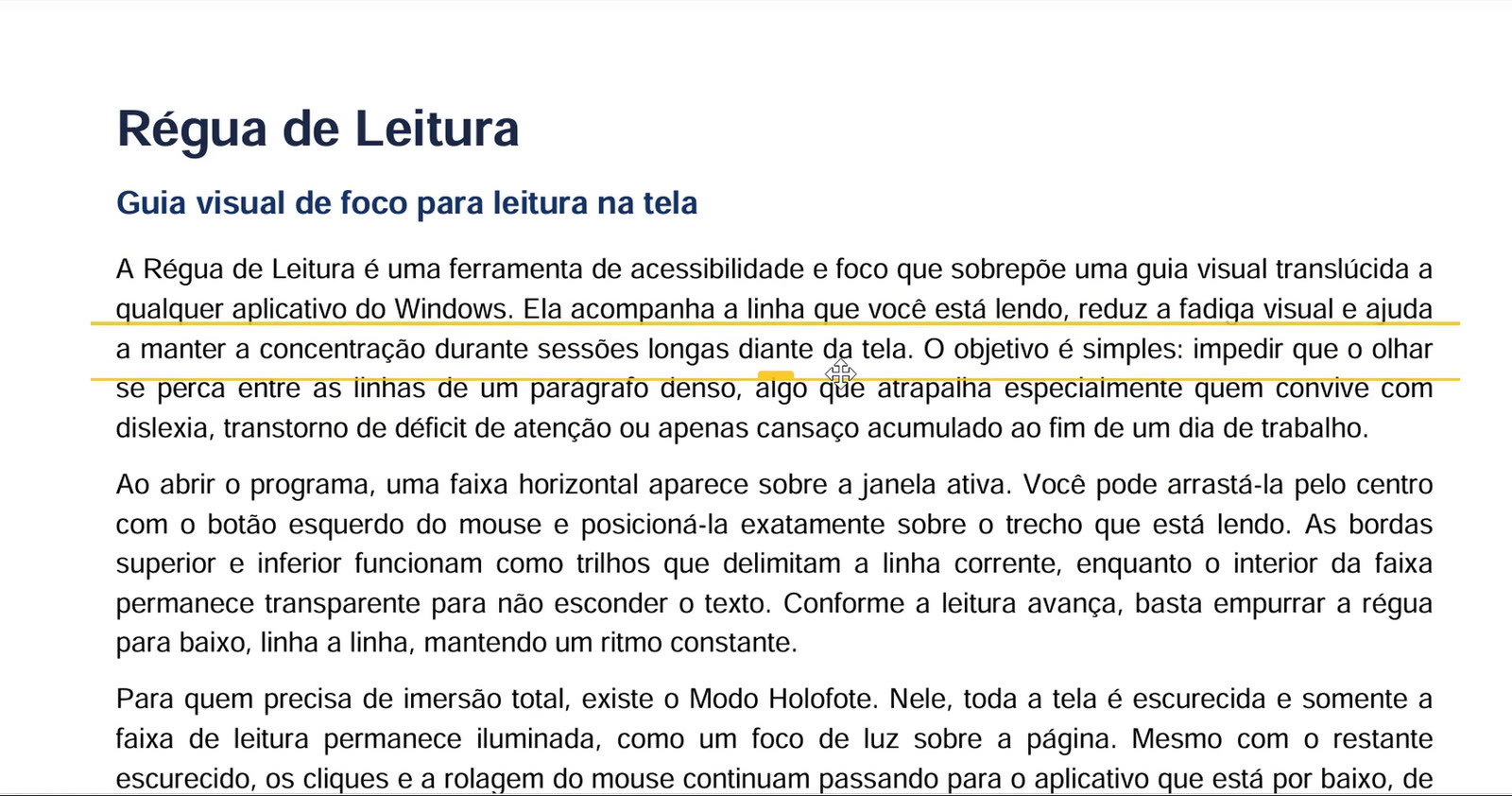
Régua de Leitura places a translucent guide bar over any Windows program — browser, PDF, Word, spreadsheets, code — and follows the line you are reading.
Windows 10 and 11 · one-time purchase · no subscription
 Régua de Leitura — Example.pdf
Made for people who read a lot on screen
If you have ever reread the same paragraph three times because your eyes jumped to the wrong line, this is exactly what the ruler fixes.
- Dyslexia and ADHD
- The guide isolates the current line and cuts down on involuntary jumps, moving competing text out of the way.
- Studying and exams
- Dense course material, e-books and academic PDFs for hours on end, with less eye fatigue.
- Proofreading and translation
- Compare two texts line by line without losing your reference point as you switch between windows.
- Code and data
- Scan long log files, CSV tables and large chunks of code without drifting into the wrong row.
What the ruler does
- Always on top
- A thin bar stays above every Windows window. The middle is transparent so it never hides the text; only the top and bottom lines mark your place.
- Spotlight Mode
- Dims the whole screen and lights up only the current line. Mouse clicks and scrolling still reach the app underneath, so you never leave focus mode.
- Adjustable color and opacity
- Five preset colors or any custom HEX/RGB color. Opacity and thickness are set separately for the middle and the edges.
- Multiple rulers, multiple monitors
- Open as many rulers as you like. Each new one goes to a monitor that doesn't have one yet, and gets its own shortcut.
- Saved profiles
- Save your favorite mix of color, opacity, border and height under a name, and apply it again with one click.
- Global keyboard shortcuts
- Show, hide and toggle Spotlight Mode from any app. With the ruler focused, the arrow keys adjust its position and size pixel by pixel.
How it works
-
Install from the Microsoft Store
One click. No sign-up and nothing to configure before you start.
-
Position the ruler
Drag it by the middle, resize it from the edges and pick the color that works best for your eyes.
-
Read at your own pace
Move the ruler down line by line. When you need full focus, turn on Spotlight Mode with Ctrl+Alt+H.
See it in action
Detailed text description of the video (accessibility)
Scene 1: A PDF document with running text opens in the default Windows reader. A translucent yellow bar with defined edges rests exactly on the line being read.
Scene 2: The cursor drags the ruler smoothly down as the paragraphs advance. The text under the transparent middle stays perfectly readable.
Scene 3: The customization menu opens, showing the color palette (blue, yellow, green, gray and pink), the opacity setting and the thickness adjustment.
Scene 4: Spotlight Mode is turned on with the global keyboard shortcut: the screen goes almost completely dark, leaving only the current line lit while the mouse keeps scrolling the page.
Price
Pay once
The price is shown in your local currency at the Microsoft Store. No subscription, no ads and no in-app purchases.
Works on Windows 10 and Windows 11 (64-bit). Subject to the Microsoft Store refund policy.
Frequently asked questions
Is the app available in English?
The app interface is currently in Brazilian Portuguese. English and Spanish versions are planned. The ruler itself has no text, so it works the same in any language.
Do I need an internet connection?
No. Once installed, the app works fully offline. Only the download and updates go through the internet.
Does the app collect or send any data?
No. Nothing is sent to any server. Your preferences (position, color, profiles) are stored only on your computer. See the Privacy Policy.
Why use Régua de Leitura instead of a browser extension?
Browser extensions only work inside that browser's tabs. Régua de Leitura is a native Windows app that works over any program: PDF readers (Acrobat), Word, Excel, Kindle for PC, VS Code, Slack or image files. It also supports multiple monitors and global keyboard shortcuts.
Which versions of Windows are supported?
Windows 10 and Windows 11, 64-bit.
Does the ruler get in the way of clicking what's underneath?
No. There is a click-through mode for the regular ruler, and in Spotlight Mode the mouse passes freely through the dimmed area.
Is it helpful for dyslexia or ADHD?
Yes, that is one of its main uses. The guide bar helps you avoid skipping lines and reduces the amount of text competing for your attention.
How do I get updates?
Automatically, through the Microsoft Store.
Is there a free trial?
The Store doesn't offer a trial period for this app, but the video above shows every feature in use before you buy. Purchases are also covered by the Microsoft Store refund policy.